Showing posts with label Blogger Tips. Show all posts

Tuesday, 28 January 2014

Merge Blogs in Blogger Tips and Tricks

Leave a Comment

 Merge Blogs in Blogger Tips and Tricks

Fashion of creating blog on blogger is increasing day by day because of its simplicity and easy to use interface. Now bloggers takes interest to create multiple blogs on blogspot for their different uses or different niche. Creating a blog on blogger is free and easy to manage that's why most of bloggers create multiple blogs for their benefits like earning money from blog by monetizing it with any advertisement programs like Google Adsense. People often use to create different blogs for same niche to monetize all blogs and to make more money from all. But sometime it's being difficult to manage all blogs with same niche because of less amount of fresh content to publish on all blogs. In that case a blogger might think to merge all his/her blogs under same niche so that it being easy to update the blog without any hassle. If you also want to combine your blogger blogs into one then read this tutorial. It is very easy to achieve the goal of combining two or more blogs. Let see how to do it.

Merging Blogs in Blogger

To merge different blogs first you have to import the data of that blog which you don't want to run anymore. Follow below steps to do it.
  1. Open that blog.
  2. Go to Settings > Other.
  3. Click on Export Blog link to download its data.

export blog

Transferring Data in Blogger

Once you export the data of your old blog, you need to import it to new one.
  1. Open new Blog.
  2. Go to Settings > Other.
  3. Now at this time click on Import Blog link.
  4. Import the downloaded data of your old blog. It will store all the blog posts and comments into your new blog.

  5. import blog
  6. You are done!
Read More...

Add Naked Custom Domain (Non WWW) in Blogger Tips and Tricks

Leave a Comment
Naked Domain
If someone wants to create a new blog then no doubt blogger is the best option to choose because of its versatile features like free hosting, SEO friendly features like Custom Robots Header Tags, custom redirection for broken or 404 error pages, Custom Robots.txt options and many more. We can even also use our own domain name to grow our blog as a professional website which looks like www.yoursite.com but there is a limitation in using custom domain name that is we can't use naked domain name or non www version of our domain name in blogger. Yesterday I shared a trick to create more than 20 static pages in blogger and today I bring another interesting trick to remove www from the domain name like yoursite.com. I pretty much sure that you guys are very interesting to know about this trick. So, let see how to do it.

Using Naked Domain in Blogger

Below are some very easy to perform steps which you have to perform to use non www domain for your blogger blog.
  1. Go to Blogger >> Settings >> Basic >> Publishing.

  2. If you are already using your domain name then click on "Edit" button just after the domain name under the Blogger Address field otherwise click on "+ Add a custom domain" link

  3. Now click on Switch to advanced settings link and type your domain name started with a single space like " makemoneyfreewithus.blogspot.com". Remember you have to put a single space before your domain name otherwise you will get  error.
  1. Now verify your domain authority by adding two CNAMEs into your Domain Name System (DNS) settings.
  1. You are done! That's it.
Read More...

Saturday, 25 January 2014

External Links into New Tab in Blogger Tips and Tricks

Leave a Comment
External Links into New Tab
Yesterday, I was posted a trick on how to add nofollow attribute to all external links automatically in blogger and today I bring another useful and helpful trick for all my blogger . In this post I will show you that how can we open all external links into new tab. This can be done by adding simple jQuery code into template. Opening external links into new tab help to reduce your blog bounce rate and also you will not lose your valuable visitors. Now you have understood the benefits of opening external links into new tab so let's begin the tutorial.

Open External Links into New Tab

  1. Go to your blogger dashboard >> Edit HTML >> Tick Expand Widget Template Box

  2. Press Ctrl+F and find the below code.
  3. </head>
  4. Now paste the below code above/before it.
  5. <script type="text/javascript" src="http://ajax.googleapis.com/ajax/libs/jquery/1.4.2/jquery.min.js"></script>
    <script type="text/javascript">
    $(document).ready(function () {
    $("a[href*='http://']:not([href*='"+location.hostname+"']),[href*='https://']:not([href*='"+location.hostname+"'])").attr("target","_blank").attr("title","Opens new window").addClass("external");
    });
    </script>

    Note: Remove red line from code if you have already any jQuery.js file in your template.

  6. Save the template.

  7. Done!

Summary!

Always open external links into new tab to prevent your visitors go away from your blog. If your visitors go outside to the external link than it will increase your blog bounce rate and hurt your blog ranking. Try to increase your blog traffic to maintain your blog ranking in search engines
Read More...

Monday, 20 January 2014

Tips and Tricks to Increase Blog Traffic Using Google Webmaster Tools

Leave a Comment
Increase Blog Traffic

Blog traffic is one of the top goals of every savvy blogger to achieve. It is a long term process to increase blog traffic significantly. You can't improve your blog traffic in a day. You have to work hard on your blog to build its ranking and readership to receive decent amount of traffic. I have already shared some tips to increase blog traffic in my previous posts that you must follow. But today I bring a very interesting and genuine trick to increase your blog traffic using Google Webmaster Tools. If you follow this trick wisely then no doubt you can double your traffic in short period of time. Without taking your time any more, let see how to use Google Webmaster Tools to improve traffic of a blog or website.

Using Google Webmaster Tools to Increase Blog Traffic

  1. Log in to your Google Webmaster Tools account.

  2. Choose your blog.

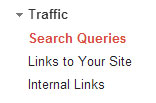
  3. Now from the left side menu, click on Traffic tab and choose Search Queries.

  4. traffic search queries
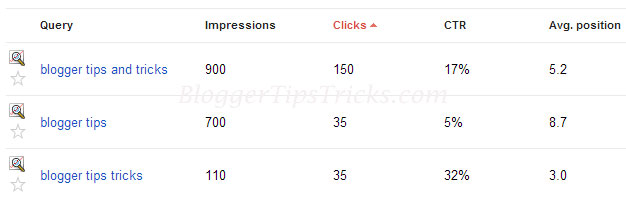
  5. Once you click on Search Queries link, a complete list of search queries terms will appear on your screen. Internet users use those keywords in search engines to find and to reach at your blog. That means you are receiving maximum traffic from those search queries. See below screenshot of search queries for this blog.

  6. search queries

  7. Now the trick is, pick all short trail keywords which are 100% relevant to your blog niche. We will target those keywords to improve traffic to our blog.

  8. Once you select the relevant keywords, list all of them into a separate text file like in notepad.

  9. If you target those keywords in your blogging, then your SERP (Search Engine Result Page) will increase very fast because they all are those keywords for which your blog is already performing well in search results.

  10. Start working on those search queries and notice a significant improvement in your blog traffic.

How to Target Keywords?

To target those keywords you can use multiple methods of SEO and blogging. I am mentioning some of them below:
  1. Start writing some best articles using those keywords for your blog. The more you update your blog targeting those keywords, the higher you rank in search results.

  2. Build Quality backlinks for those articles and use your keywords in link building.
  1. Do Off page SEO for your blog by targeting those search queries. You can use article submission, Social Bookmarking, Directory Submission etc.
Read More...

Best Tip and Trick Find CommentLuv / KeywordLuv Enabled Blogs for Commenting

Leave a Comment
Find KeywordLuv Enabled Blogs
Blog commenting is the best and safe way to get high quality dofollow backlinks instantly. It not only helps in link building but also help to increase blog traffic and readers. Many newbie bloggers tired of locating KeywordLuv and CommentLuv enabled blogs to insert desired links to increase number of quality backlinks. In one of my previous article on "Tips To Build Quality Backlinks For Blog" I shared a trick to manually search CommentLuv and KeywordLuv enabled blogs. But today I came with an interesting online tool that will make your task easier. Now you will be able to search those blogs easily where you can leave comments to gain backlinks. Let's discuss about that online tool and take a look how to use it.

Finding CommentLuv and KeywordLuv Enabled Blogs

There are two websites that we will use today to learn how to find dofollow blogs for commenting. They are PutMyLink.com and DropMyLink.com and both are almost same. You can use anyone to start your work. Let see how to use them.
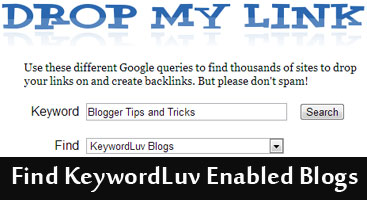
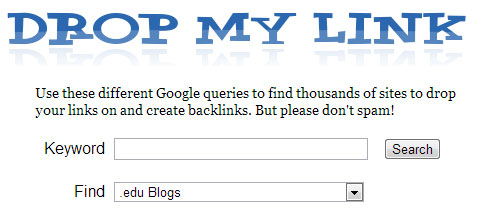
  1. Go to DropMyLink.com.

  2. Now you will see two options first is for Keyword and second one is Find where you select which type of blogs you want to search.

  3. keywordluv blogs

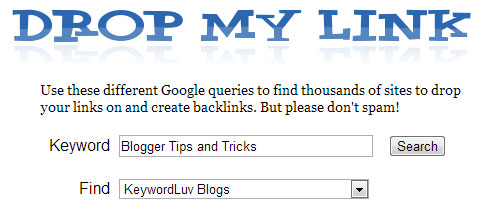
  4. Now type your keyword and choose Keywordluv Blogs from the drop down menu.

  5. Best Tip and Trick Find CommentLuv / KeywordLuv Enabled Blogs for Commenting
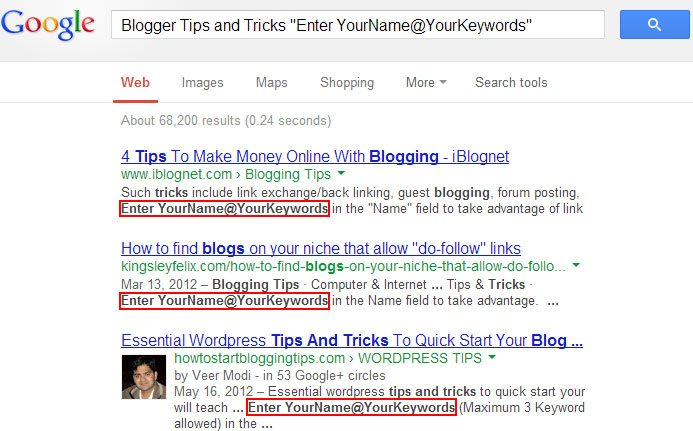
  6. Now click on Search button that will open a Google search page in new tab like below.

  7. CommentLuv enabled blogs
  8. You can notice Enter YourName@YourKeywords in the above image in each result. That means those blogs are KeywordLuv Enabled.

  9. Open those blogs and start commenting.

  10. You can find CommentLuv enabled blogs using same method.

  11. That's it.
  • Must Check: How to Check Keywords Ranking on Google?
Read More...

Saturday, 18 January 2014

4 Qualified Blogger Tips For Increasing Blog Readership

Leave a Comment
 

Hi friends! Blogger tips and tricks is my passion, the blogging tips for location promotion cited in this article are directed at helping new web enterprise owners construct their readership base and relish greater profits from their online marketing efforts. Simply read and request these super secrets for increasing blog attractiveness - if you can handle the traffic!

Here are blogging secrets are legitimate, very simple to realise and productive in drumming up web sales! These 4 tips are conceived to help blog proprietors make a personal attachment with their goal readers, and convert them into loyal customers over a short period of time with reliable application of these expert blogging tips, which are founded on a proven approach to blog site advancement!


1. Use everyday words and everyday life as the basis for your blog posts! 
This simple blogging tip may come as a surprise for many web business owners but it is known to work, so don't trash the idea just because it sounds too easy! Big words cut the connect with the average reader (research indicates the most popular blog sites use simple language, a friendly tone, even humor and original information the reader can use, or be entertained by). Succinct phrases, commonly used words and writing the way you talk helps build a relaxing feel around the blogosphere, which helps engage blog readers, earning your blog steady traffic.

2. Focus on giving value to your blog readers rather than sticking to the rule book!
Don't worry too much about sounding literary and rules of grammar, as even the better business blogs today follow an informal, even humorous format. Of course, it makes sense to use an active voice for your blog posts, if site promotion is your main aim. Doing so will help you address the reader as an individual, which improves the personalized feel necessary to convert a lead into a customer. But, on the whole, if you've gotten the main points across clearly in an organized manner, fixed any spelling errors and avoid inflated language or too much jargon in your blog post, site promotion will fall naturally in place.

3. Keep a friend handy to keep your blog writing honest! 
A good friend will be honest in pointing out obvious flaws in your blog writing, including disorganized thoughts or content that is overly sale-sy. So enlist a close pal to help you give your best voice to the most important blog posts. Your posts should 'sound like you' and be consistent with the image of your web business. Work with your friendly critic to ensure all your blog posts are authentic and appealing. This sincerity will help you build your blog readership and traffic substantially, especially if you have a flair for creative writing.

Combine original content with proven SEO tactics, like long-tail keyword integration in a natural manner to increase the relevance of your blog posts for better site promotion on Google and Yahoo!

4. Read your blog posts out loud! 
This step will draw your attention to any awkward sentence structure and poor punctuation that may have crept into your blog post's first draft. Fix the parts you seem to 'stumble' over with words and phrases that fit more naturally in the flow of the topic before you make the post 'live.'
Read More...

Sunday, 12 January 2014

Top 7 Tips to Reuse Great Content and Get More Value

Leave a Comment
Top 7 Tips to Reuse Great Content and Get More Value

Creating unique content on a regular basis for your website, social media platforms, newsletters, and your article portfolio is a massive undertaking. Did you know you can squeeze more value out of your articles?
Use these tips to reuse your quality article content to create valuable media across your platform.
  1. Social Media
    Based on the information you present in your articles, write informative tweets (Twitter), posts (Facebook and Google+), and even pins (Pinterest). Want to create a meme your audience will share? Pull a motivating, inspiring, or engaging quote from your article and add it to a relevant, meaningful image.


  2. Video
    Develop scripts from your articles to create informative video shorts. Transpose your article by reading your article out loud and swap out any language that feels too stuffy, verbose, or formal. Tip: Videos are all about being visual. Keep it visually interesting by using visual aids (e.g., whiteboards or overlay text/images) to help convey your point.

  3. Webinar
    Based on one or more related articles, create an online slide presentation that (1) outlines a process or concept, (2) provides a step-by-step process or supporting evidence, (3) shows milestones or how to measure progress, and (4) provides a call-to-action. Promote your upcoming presentation across your platform by inviting your audience to participate with their questions and comments. Use your live articles as fodder to help spark interest and to help your audience come prepared for participation.

  4. Ebooks and Reports
    Transform your related, published articles into a downloadable PDF (ebook or report). Use it as incentive to visit your website from the Resource Box of your next set of articles, your social media posts, newsletters, and more. You can also choose to sell your PDF or offer it as a bonus for purchasing another product.

  5. Print
    If you own a brick-and-mortar business, print off your best articles and make them readily available in your store or waiting room. Your visitors or prospective clients will be more relaxed (and impressed!) when they see the extent of your knowledge through your articles. Simply select the “Print this article” button in the Article Tools section that appears below your published articles.

  6. Infographics
    Illustrate key points, data, and steps from your published articles in visually dynamic infographics. Be selective about the type and amount of information you pull from your articles to present in your infographics. What makes great infographic fodder? Article content that discusses quantitative data, qualitative data, pros/cons, comparative analysis, timeline, and definitive facts or figures.

  7. Podcasts
    Go audio by turning your articles into a podcast series. It’s easy to do all you need is a microphone and audio recording software. Similar to developing video scripts, transpose your articles into an audio script by ensuring the language “speaks” clearly to your audience.


    By Vanessa
Read More...

Sunday, 5 January 2014

Hot Tip Use the US version-google search

Leave a Comment
 Hot Tip Use the US version-google search


Hot Tip Use the US version-google search Being US based, Google tends to roll out all its new features to the US English version first, leaving the UK English version to languish. If you can stand a few misspelled words in exchange for shiny features:

Click the Settings link in the top right-hand corner
Change the Mail display language to English (US), scroll down and click Save changes
Read More...

Thursday, 2 January 2014

View Google's New Mobile Sitemap Format

Leave a Comment
View Google's New Mobile Sitemap Format


The Search Gaint Google has changed it mobile sitemap format with new tag and additional name space requirement, below is the new format..


<?xml version="1.0" encoding="UTF-8" ?>
<urlset xmlns="http://www.sitemaps.org/schemas/sitemap/0.9"
xmlns:mobile="http://www.google.com/schemas/sitemap-mobile/1.0">
<url>
<loc>http://mobile.example.com/article100.html</loc>
<mobile:mobile/>
</url>
</urlset>


If the <mobile:mobile/> tag is missing, your mobile URLs won't be properly crawled. Each Mobile Sitemap must have a unique name. 

Read More...

Googles recommendations for linking between mobile and non mobile pages of a site

Leave a Comment
Googles recommendations for linking between mobile and non mobile pages of a site


Blogger tips and tricks not a fun. But we can try to create it fun . Friends ! Today i share an article how to Googles recommendations for linking between mobile and non mobile pages of a site for non responsive design..

Annotations for desktop and mobile URLs

To help our algorithms understand this configuration on your site, we recommend using the following annotations:

On the desktop page, add a special link rel="alternate" tag pointing to the corresponding mobile URL. This helps Googlebot discover the location of your site's mobile pages.
On the mobile page, add a link rel="canonical" tag pointing to the corresponding desktop URL.

We support two methods to have this annotation: in the HTML of the pages themselves and in Sitemaps. For example, suppose that the desktop URL is http://example.com/page-1 and the corresponding mobile URL is http://m.example.com/page-1 . The annotations in this example would be as follows:
Annotation in the HTML

On the desktop page, add:

and on the mobile page, the required annotation should be:

This rel="canonical" tag on the mobile URL pointing to the desktop page is required.

Taken from : https://developers.google.com/webmasters/smartphone-sites/details 


Read More...

Wednesday, 18 December 2013

This Xmas Building Links With your Staff

Leave a Comment
This Xmas Building Links With your Staff

There has been much said about building links this year and we thought it would be a good idea to give you a quick and simple technique to help your search engine optimization process and give your staff a Xmas present. You are a great boss after all!

Solution
Simply ask all your staff who has a blog and ask your staff if they would consider placing a footer link in their blog that is keyword rich to your site. In return every year you will pay for the hosting fees for their blog on their own domain, if they are not hosting on their own domain name offer to pay for the domain name registration as well. This could make a great little Xmas present to your staff every year, but it is best get them something else as well!

Important
You should make it perfectly clear that the ownership of the blog is 100% theirs regardless of the hosting or domain name fees you will pay. Offer to sign a contract stating that you (your business) are not entitled to ownership of the blog or part there of regardless of the fees that are being paid. This may help them be comfortable with the idea.

One Step Further
After you have set up an army of bloggers within your business offer to allocate a set amount of time each week for them to blog during work hours. See some of the possible benefits below of implementing this.

Benefits
You will be cool boss because:
  • you give your staff time to blog during work, saves them time after work as well.
  • gives them a break from their everyday task
  • re stimulates the minds of your employees and generates creativity
  • employees are happier creating a happier working environment
  • creativity in employees flows over into the work place increasing productivity and enthusiasm for their job and work place
  • Customers have a better experience with your employees because they are happier
  • YOU BUILD KEYWORD RICH LINKS that help your online marketing campaigns.

Advanced Option
If your staff are willing to do this it would be very beneficial to your search rankings.
When adding the keyword links to your employees blogs, change the location of the H1 HTML tags on the blog template and the individual page template to be surrounding the keyword link to the business site in the footer. You will need to change the CSS for the H1 tag so the links blends in and is not RIGHT IN YOUR FACE!

Optional
If you end up with a few bloggers for your cause, it would be a good idea to allocate pages for certain employees to link to.
For example, Blogger Employee 1 links to home page, Blogger Employee 2 links to sub page 1, Blogger Employee 3 links to sub page 2 etc.


 By Bradley J Davis

Read More...

Wednesday, 4 December 2013

Best way for Bloggers to Make Money Online

Leave a Comment
 Best way for Bloggers to Make Money Online

Best way for Bloggers to Make Money Online. Blogging is more than just fun now. People love to have blogs for making money and in pursuit of their goal to make money online many are running more than one blog. Search engines offer unlimited traffic to blogs. Bloggers are also getting Ads from Google Adsense and other resources. That’s helping them make money online with small but rightly targeted efforts.

If you are a blogger your prime aim should be to provide people with useful and authentic information they are looking for. Your blog posts should be of very high quality providing such information which attracts a reader and engages him/her. When readers remain on your blog for long time search engines put it on a higher ranking.

Mind that your content should provide information what people want to read. Not just that you stick to your own likes and dislikes about related topic of your blog. Moreover exchange views with your audience, take their opinion and give them worth. Reply to the comments even if they are offending and make your readers feel that their views and opinions are worthwhile for you.

So, you see that just doing one thing- writing good quality and engaging content- can make you a lot of money online. However it doesn’t mean that you leave out other important things aside. You have to work on SEO of your blog, social media marketing and using Goolge tools like Google Adwords, Google Analytics etc as well to enhance your blog’s ranking in the search engines.
Read More...

How to Select a Moneymaking Blog Topic

Leave a Comment
How to Select a Moneymaking Blog Topic 

How to Select a Moneymaking Blog Topic? We advised the many causes to blog. One big reason for blogging is to earn income from writing. In fact, that's what my entire blog is about. Huh, well I estimate it's time to gaze at how to make money from blogging. That's probably what you've been waiting for this entire time.

The first step is to select the right topic. Now, you might be tempted to gaze up peak earning blog topics, so that you can maximize your earnings. If you did that then you would find a list like this one:

Blogging tips (I didn't pick this niche from looking at a list)

Technology
Social media
Q & A
Fashion
Health
Etc.

These are all great topics. My blog even intersects with the first one. But, you shouldn't select a topic from looking at a register. Why? Because you need to love what you blog about and supply really exclusive and cooperative information in alignment to earn cash from your blog.

How should you select a blog topic? 
 These are all great topics. My blog even intersects with the first one. But, you shouldn't choose a topic from looking at a list. Why? Because you need to love what you blog about and provide truly unique and helpful information in order to earn money from your blog.

How should you choose a blog topic?
I would like to defer to the $100 startup on this (best book ever). In his book, Chris Guillebeau explains how the most successful businesses are created from the convergence of your passion and what others care about. Let's look at how I used this method:

My Passions: Translation, language learning, writing, business and technology.

What others care about: Earning money, gaining greater freedom, have a more successful business/career, earning money from writing (there are lots of aspiring writers out there).

Convergence: My passion for writing and business can help people to earn income from writing.

Using this system, I was able to choose a blog topic that is interesting to me and to other people. This is extremely important. Unless you are blogging about something that you love, you will lose steam and lose interest in blogging. Remember that the key to earning money from a blog is being consistent with your posts and providing great content. If you can do these two things then your blog will be profitable sooner or later.

Now, take out a piece of paper (I always tell you to do this don't I). On one side of the piece of paper write down your passions and on the other side write down what people care about. Is there a convergence between the two columns? Draw a line to represent the convergence. Below this line write out all of your blog ideas that make use of your passion and other people's interests.

The reason that this system works is because it focuses on helping others. Every single successful business in the world somehow helps its clients. If your blog is truly helpful and unique then it will be successful and profitable.

In a future post, we will take this one step further and look at how to give your blog a unique value proposition.

Better communication can change your life and increase your income!

Author  : Alex R Hughes
Read More...

Tuesday, 5 November 2013

Best Content Best SEO Tips for you

Leave a Comment

Best Content Best SEO Tips for you
Best Content Best SEO Tips for you. Content is the most important for blogs pure content pure money its a true friends!We know our reader very important for us i think that will decided blogger career. You may be good at content marketing, but you will hardly see any growth unless there is something compelling to your readers.
  1. Create fresh and quality contents: Give your readers something new every time they visit your blog. Update often and give importance to latest trends and news and updates regarding your niche.
  2. Focus on your topic: If your are writing about traffic tips, stay focused on that topic. Provide in depth and detailed information to cover that topic. The visitors will soon leave once they find anything unrelated to the subject. You can make use of images and videos to make your subject more clear and enjoyable.
  3. Avoid errors: Give your readers an easy to understand article with no spelling or grammatical errors. You are loosing your credibility by such small errors.
  4. Do not write for search engine: Optimizing your content for search engines is different from writing for search engines. Keep it in mind. Inserting various unnecessary keywords intended primarily to attain higher search engine ranking may annoy your readers. If you don’t how to use keywords in blog posts then I must recommend you to read this

Anchor text are click-able texts that points to a link. The format is <a href=”#”>Your text</a>. It will simply show “Your text” pointing to the link mentioned instead of #. This text tells the users and search engines about the content you are linking.

There are two types of linking - Internal and External linking. Internal linking is pointing to a page of your own website. The main advantage of internal linking is that you keep on engaging your readers. Visitors who comes to your blog will most likely read the article and leave unless you provide something more to read. By doing internal linking, you are giving them options – options to discover more content of your blog. Moreover, Internal linking will help search engines crawlers to index your pages fast and they even help in improving search engine rankings.

With appropriate anchor text, users and search engines can easily guess what the linked page is all about.

Common practices for Anchor text linking

    Choose a suitable phrase to represent an anchor text instead of a word or two.
    Avoid long anchor texts
    Avoid keyword stuffing

The best practice is to put the title of an article in the anchor text, since most likely you have put the best phrase in your title.

Image Optimization and importance of Alt text

Image optimization includes optimizing your images for both your readers and search engines. Google image search can bring you a lots of traffic if you optimize you images accordingly.

Let understand what is Alt text and why it is important?


Alt text is simply the alternative text that tells the search engines about the images. Search engines can’t really guess what an image is all about. They are completely blind to non-text multimedia information.

The importance of Alt text lies in the fact that if due to any reason, the image do not loads completely in the visitor’s browser, the alt text will be displayed instead of images and tells your visitors what is the image all about.

Optimizing alt text

    The best practice is to put your best keywords in the alt text keeping in mind the context of images.
    Provide a short descriptive text as alt text instead of a word.
    If you are using your image as a link, its the Alt text that will work as Anchor text.

Read More...

Sunday, 3 November 2013

Directions For a vest Webmaster in urdu

Leave a Comment
Hi Freinds to day i share a post Directions For a vest Webmaster in urdu, we know how to increase money at google adsens. Thes Tips Use earn money Google adsense no block account no tanshan no Probleme And increase adsense income, Free Guide blogger or google adsense other sites Enjoy Google Adsense Earning.


Read More...

Saturday, 26 October 2013

Best 4 Tips Write Comments that Attract Eager New Readers

Leave a Comment


Best 4 Tips Write Comments that Attract Eager New Readers is the best tips for new and old blogger .

1 Make Comments Attract Content

Build each comment like a part of content to snag the vigilance of new readers. post a greeting, body and conclusion/sign off to make persons take notice. I like welcome my young person blogger by title then I make a issue discussing some aspect of the post. This displays that I actually read the mail. I delve into the theme for at least a couple of paragraphs.

After distributing my outlook I express gratitude the blogger for posting then advance to sign off with my first title. This sears an effect on the minds of commentary readers.

2 Commentary Persistently

Commentating on a blog one time every few weeks does not slash it. Become memorable by programming blog readers with your continual, consistent, valuable remarks. Have you observed how commercials or TV shows appear to augment on you after glimpsing them more than a couple of times? Commenting persistently yields a alike effect.

Persons will state, “Hey I understand that Michel guy, he habitually departs helpful remarks on blog posts”, each time they come over yourcomments. Persistence wins in the book reader attracting game. After someone augments on you it is a matter of time before you become a trusted reader of their blog.

3 Share Your know-how

No regurgitating of the same vintage answer to a blog mail. I have heard that you desire to conceive valuable mails for snagging more readers, and if I just replicate this line then most readers will melody out my commentaryary immediately. Write certain thing different by sharing your know-how. remarks are easily mini blog mails designed to add worth to a post.

That is it, just a part of content you can use to relay an experience which assists a blogging assembly. Share tales. Make an influence. Teach lessons. Seize your chance to glow. notify your article to influence readers and motivate more than a couple of to visit your blog.

4 Never Consign a Comment Propel By

I am guilty of this. I accept it. If I feel rushed or care not about the blog subject issue I mail 1 line comments occasionally. large-scale mistake. I missed my chance to make an impact. Write 3-4 paragraphs. No need to compose long paragraphs; 1 judgment will do. But propose to conceive a masterpiece each time you commentary to become memorable and attract more readers.

This approach of writing in-depth, thoughtful, mindful comments can reel in new readers by the boatload. Stick to this scheme, add worth, make an impact and you too will attract new readers to your blog in no time.
Read More...

Latest 4 Tips Evolving a Blogging Networking Appliance

Leave a Comment
 Latest 4 Tips Evolving a Blogging Networking Appliance

Hi friends ! I hope all is well to day i share a post that is Latest 4 Tips Evolving a Blogging Networking Appliance. Read below.

1 Be a Ally to Become a Ally
Be a friend. Support persons you meet. Be pleasant. Be cooperative. Be a ally. This is easy. This easy proceed groups the foundation for a prospering relationship.

How do you treat offline associates? Well heal your online blogging associates the identical way. Help. Go above and beyond to support your associates.

2 Conceive Comments like Content
The easiest way to make an impact in minutes is to read a blog post and conceive a memorable, valuable, part of content with your comments. You will stand out from the gathering and make a ton of associates.

Comments can be your best ally in the networking department. Bloggers love obtaining comments. Awesome comments? Well heck, you will have a blogger ally for life if you post 3-4 paragraph masterpieces on their blog, because each commentary is a part of content.

This means that search engine love crawling sites and seeing many insightful comments. Active, engaging blogs do well in search motors which of course spikes your blog traffic quickly.

3 Create Visitor Posts for Buddies
I come to out to ABC to see if he required me to compose a visitor mail. He did. So I churned this out. Here I am, making buddies with his assembly and reinforcing my connection with ABC too.

My mesh augments more powerful and guess what? visitor posting benefits me too. Win-win situation here. I expand my occurrence and increase my blog traffic while supplying ABC with helpful, relevant content for his blog.

So our companionship augments stronger, my network elaborates and both parties win.

Be hard-hitting on the visitor posting front to become a genuine networking appliance. well known entertainers network like angry, collaborating with other vocalists. identical deal with guest blogging. displaying up universal makes you memorable.

4 Open Up Your Blog to Guest Posting
This one is strong to pursue for numerous bloggers. Perfectionists or selfish persons desire all the publicity for themselves. regrettably, selfish, hungry persons make couple of associates in this world.

Bountiful persons become networking machines. Because generous persons are well liked; we all love free givers.
Read More...

Sunday, 20 October 2013

Best 4 Tips to Stop Hashtags Abuse

Leave a Comment
Best 4 Tips to Stop Hashtags Abuse

Hi friends ! Today i share a article about how to stop hashtags abuse? No issue what it is you’re composing about, hashtags can boost your page views and in some situations bring a entire new readership to your location. Of course, like everything else – you need to do things properly. If you’re organising a blog or in ascribe of one’s Social media, you should already be well known with how to use hashtags to encourage your posts and content. although, lately mind-set towards hashtags have altered across the www as a entire. For blog maintainers, that means you have to rethink how you encourage your mails using Hashtags.

Here are some tips on what to do and what not to do when looking to actually encourage posts using hashtags.

1 Don’t be Conspicuous

Let’s state you have a post that you desire to encourage on Twitter, Google+ and Facebook to drag in a quick signal of traffic and confidently hold some of them as permanent readers. This post could be about Miley Cyrus – for argument’s sake – and if you’re looking to get some hits off of Twitter, the conspicuous alternative mileycyrus. although, every person is going to be utilising that tag, particularly after she’s done certain thing else controversial.

2 Take the Subtle, Yet Productive Approach

Instead of going for the conspicuous tag, you should try and work certain thing into your share. Like for instance “Perhaps miley should stop…”. With a Tweet like that, you’re still getting some juice extract extract from the Miley Cyrus buzz but, you don’t look like you’re out of place. Besides, Twitter can do all the rest.

This way you’re still aiming at the topic but, you get to be the site standing overhead the disturbance.

Going this route isn’t super-effective for an instant boost of traffic however, this is one of the more effective ways to keep those readers coming back, following your Twitter account and retweeting your subsequent tweets. It’s the little things that count when earning esteem online.

3 Bypass “Hashtag Misuse”

Lately, the Internet and the newspapers as a entire have turned to “Hashtag Abuse”. If you’re unfamiliar with the period, it’s essentially a way to describe the over-use of hashtags in a post, like this:

Only one or two hashtags are required for a mail to get vigilance. It’s all in how you use them, too.

4 Take Your Time and Turn Off Auto-Sharing

Counting on the amount of posts you’re dispatching to your Twitter account, auto-sharing your posts as Tweets is likely doing you more harm than good. particularly if you use one hashtag for all of your posts. If it’s manageable, you’re far better off doing things manually. distributing a mail manually to Twitter doesn’t take too much longer and that way you can better choose which hashtags to use. Not every mail desires the same hashtag and in some situations, the right hashtag can be all your post needs to actually take off.
Read More...

Saturday, 19 October 2013

Blogger Custom Domain With a Godaddy Account

Leave a Comment
Blogger Custom Domain With a Godaddy Account

Blogger Custom Domain With a Go-daddy Account. Hi Friends, converting a blog to Custom domain is very easy (because, the complete hosting procedure will be taken care by the blogger itself), but if you buy a domain from GoDaddy or other webhosting services, then you have to manually create the settings in the blogger as well as in your domain manager. This is a very easy step. Just follow the steps below.

1. Log into your Blogger Account -> Settings Tab -> Publishing Tab.
2. Click on "Switch to Custom Domain".
3. Now, Click on "Switch to advanced settings".
4. Enter your domain {Ex:healthidia.com} -> Enter the Word Verification and Click Save Settings
5. On the next page, Check the box [Redirect healthidia.com] -> Enter Word Verification -> Save Settings.

Now, you will be shown "Congratulations, your blog is ready!"

6. Now, Log into your GoDaddy Account & Go to Domains -> My Domains{Domain Manager}.
7. Click on your Sitename & Open Nameservers Link.
8. Enter [NS09. DOMAINCONTROL.COM] for Nameserver 1 and [NS10. DOMAINCONTROL.COM] for nameserver 2. Make sure, you selected Custom name servers.
9. Now, Click on Total DNS Control and MX Records.
10. Delete any existing A records if any (the ones at the top)
11. Click on "Add New A Record".
12. Enter the details as shown in below figure & Click OK.
13. Delete the CNAME that has a Host of www
14. Click Add New CNAME Record
15. Put www in the Enter an Alias Name field, ghs.google.com in the Points to Host Name field and leave the TTL as 1 Hour.

Click on OK.

NOTE: The settings may take 1 hour to be saved and to be worked. It's Very Easy to Set Up Blogger Custom Domain Using Godaddy if you follow all the above said instructions.
Read More...

How to Optimize Your Blogger Blog Titles Search engine Friendly

Leave a Comment
How to Optimize Your Blogger Blog Titles Search engine Friendly

How to Optimize Your Blogger Blog Titles Search engine Friendly. This post will help new blogger blog proprietors and all bloggers to make their blog SEO friendly Titles.By default Blogger blog names are not SEO friendly. Page Title is group of text that seems on peak of your browser.It is more significant in displaying your blog/blog posts on Search engine results.The sheet name is the most significant element in your blog in periods of higher ranking in Search engine.
 
Google only exhibitions 70 individual features on Google Search results and in case of Yahoo brandish bit more.So your blog posts will not brandish or you will not get as much grade in Search Results.Let us believe about reversing of place of the blog title and post title,Giving the first main concern to Post title and it will works.

Lets see how to optimize your blogger blog titles Search engine friendly.
  • Go to Design->Edit HTML
  • find the following 
<title><data:blog.pageTitle/></title>
  • Replace the it with the following code
<b:if cond='data:blog.pageType == &quot;index&quot;'>
<title><data:blog.pageTitle/></title>
<b:else/>
<title><data:blog.pageName/> - NetOops Blog</title>
</b:if>
Replace the red text by your blog's Name
Done..! you have an SEO friendly page title.

Read More...